Rust—web assembly 101
In this article, we will use Rust to build and compile into web assembly and execute from the browser.
Here is what we will do. A user will drag and drop a text file to the web browser. Then we use Rust to convert to upper case letters via web-assembly, and toss back to the user. Obviously, this upper case operation is just for demonstration purposes, and one would replace it with a more complex function.
Below is how the page will look like. There is a drag and drop box, and the Save as button will appear when the converted file is ready. So, let’s do this.
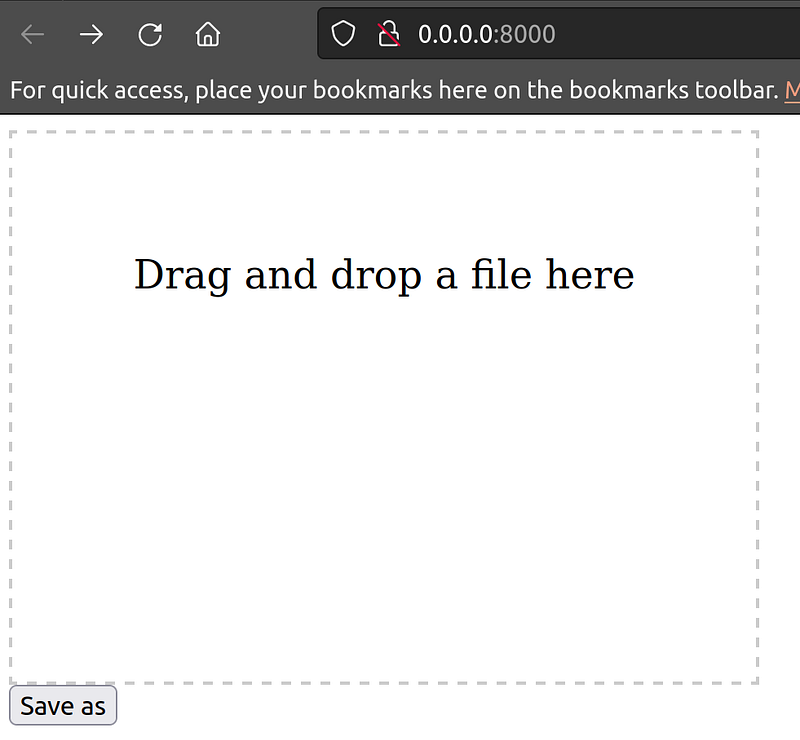
First, we need wasm-pack crate
cargo install wasm-pack
Next, let’s create a cargo for this project
$ cargo new --lib hello-wasm
$ cd hello-wasm
Then, modify src/lib.rs file to add the Rust function
// This is the Rust code that is compiled to WebAssembly
use wasm_bindgen::prelude::*;

// This function takes a slice of bytes and returns a new vector of bytes with all letters capitalized
#[wasm_bindgen]
pub fn to_uppercase(bytes: &[u8]) -> Vec<u8> {
    // Convert the bytes to a string
    let s = String::from_utf8_lossy(bytes);

    // Capitalize all letters in the string
    let upper_s = s.to_uppercase();

    // Convert the string back to a vector of bytes and return it
    upper_s.into_bytes()
}
We also need to add dependencies to Cargo.toml
[lib]
crate-type = ["cdylib"]

[dependencies]
wasm-bindgen = "0.2"
Now, we create the web assembly package
$ wasm-pack build --target web
Finally, we create index.html page
<!DOCTYPE html>
<html>

<head>
  <title>Drag and Drop File</title>
  <style>
    #drop-zone {
      width: 300px;
      height: 200px;
      border: 2px dashed #ccc;
      text-align: center;
      padding: 40px;
      font-size: 20px;
    }
  </style>
</head>

<body>
  <div id="drop-zone">
    <p>Drag and drop a file here</p>
  </div>
  <button id="save-button" style="display: none;">Save as</button>

  <script type="module">
    import init, { to_uppercase } from './pkg/hello_wasm.js';

    async function run() {
      await init();

      const dropZone = document.getElementById('drop-zone');
      const saveButton = document.getElementById('save-button');

      dropZone.addEventListener('dragover', (e) => {
        e.preventDefault();
        dropZone.style.backgroundColor = '#f2f2f2';
      });

      dropZone.addEventListener('dragleave', (e) => {
        e.preventDefault();
        dropZone.style.backgroundColor = 'transparent';
      });

      dropZone.addEventListener('drop', (e) => {
        e.preventDefault();
        dropZone.style.backgroundColor = 'transparent';
        const file = e.dataTransfer.files[0];
        const reader = new FileReader();

        reader.onload = (e) => {
          const content = e.target.result;

          // Convert the content to a Uint8Array
          const bytes = new Uint8Array(content);

          // Call the Rust function that converts all letters to capital letters
          const upperBytes = to_uppercase(bytes);

          // Convert the Uint8Array back to a string
          const upperText = new TextDecoder().decode(upperBytes);

          // Create a download link with the converted text and the original file name
          const downloadLink = document.createElement('a');
          downloadLink.href = URL.createObjectURL(new Blob([upperText], { type: 'text/plain' }));
          downloadLink.download = file.name;

          // Show the save button and add a click event listener
          saveButton.style.display = 'block';
          saveButton.addEventListener('click', () => {
            downloadLink.click();
          });
        };

        // Read the file as an array buffer
        reader.readAsArrayBuffer(file);

      });
    }

    run();
  </script>
</body>

</html>
Alright, let’s run it and see
$ python3 -m http.server
Try to drag a text file into the drag and drop box. A Save as button should appear, from which you can download the capitalized text file!
Update: Rodney James shared that Rustc 1.70.0 or higher is required to follow this exercise.